Connect a tenant
Connect and authorise each Microsoft tenant individually. Specify any accounts or apps required for the relevant checks.

remivis makes applications, permissions and configuration visible. Nine inventory areas and eleven Entra ID checks give your team a basis for understanding findings and following up on actions.
For MSPs and internal IT teams. The pilot is not yet publicly available.
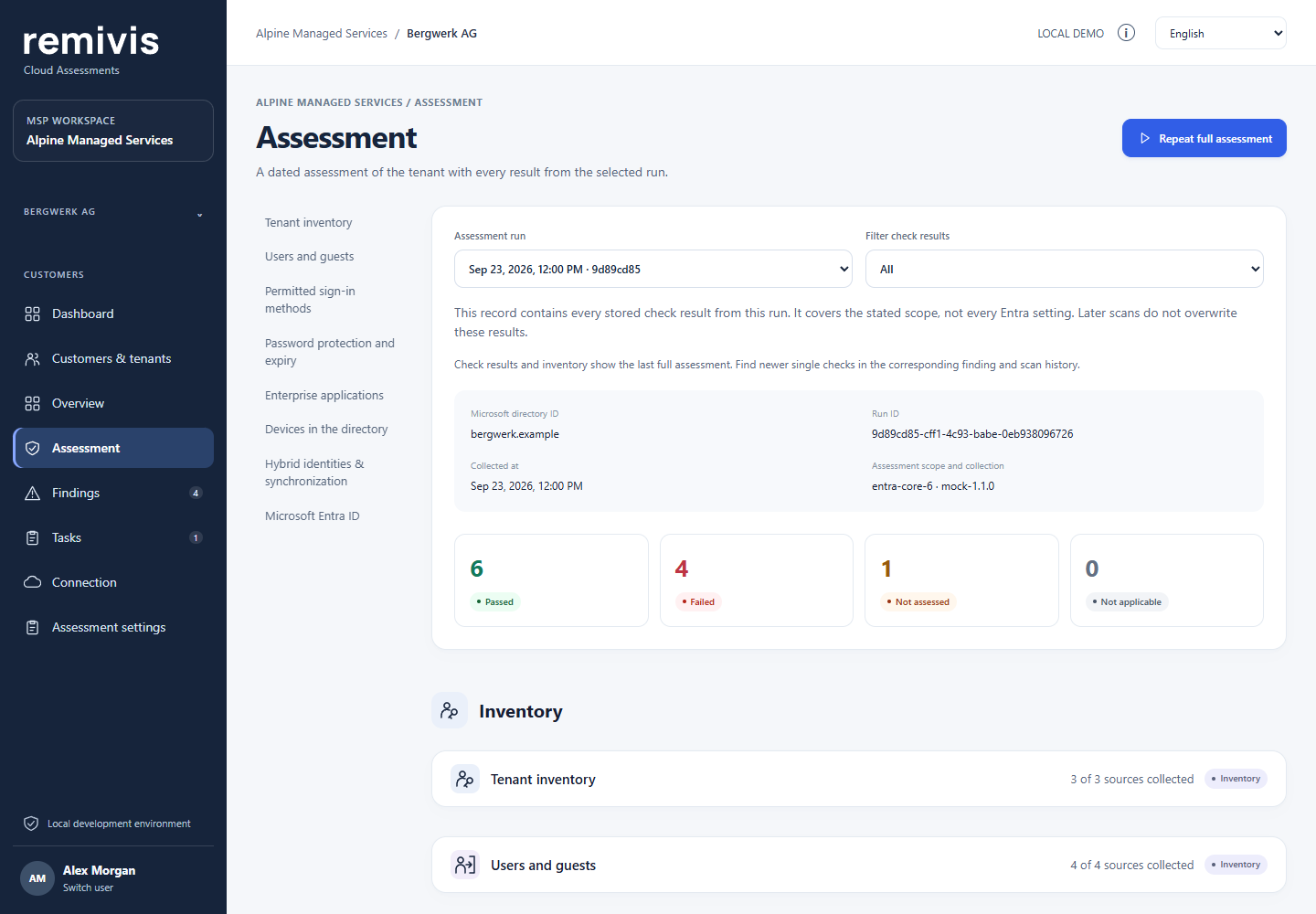
In this demo, ENTRA-007 is “Not assessed”: the declaration of which accounts are used for everyday work is missing. remivis makes this gap visible.
A CLOSER LOOK AT THE INVENTORY
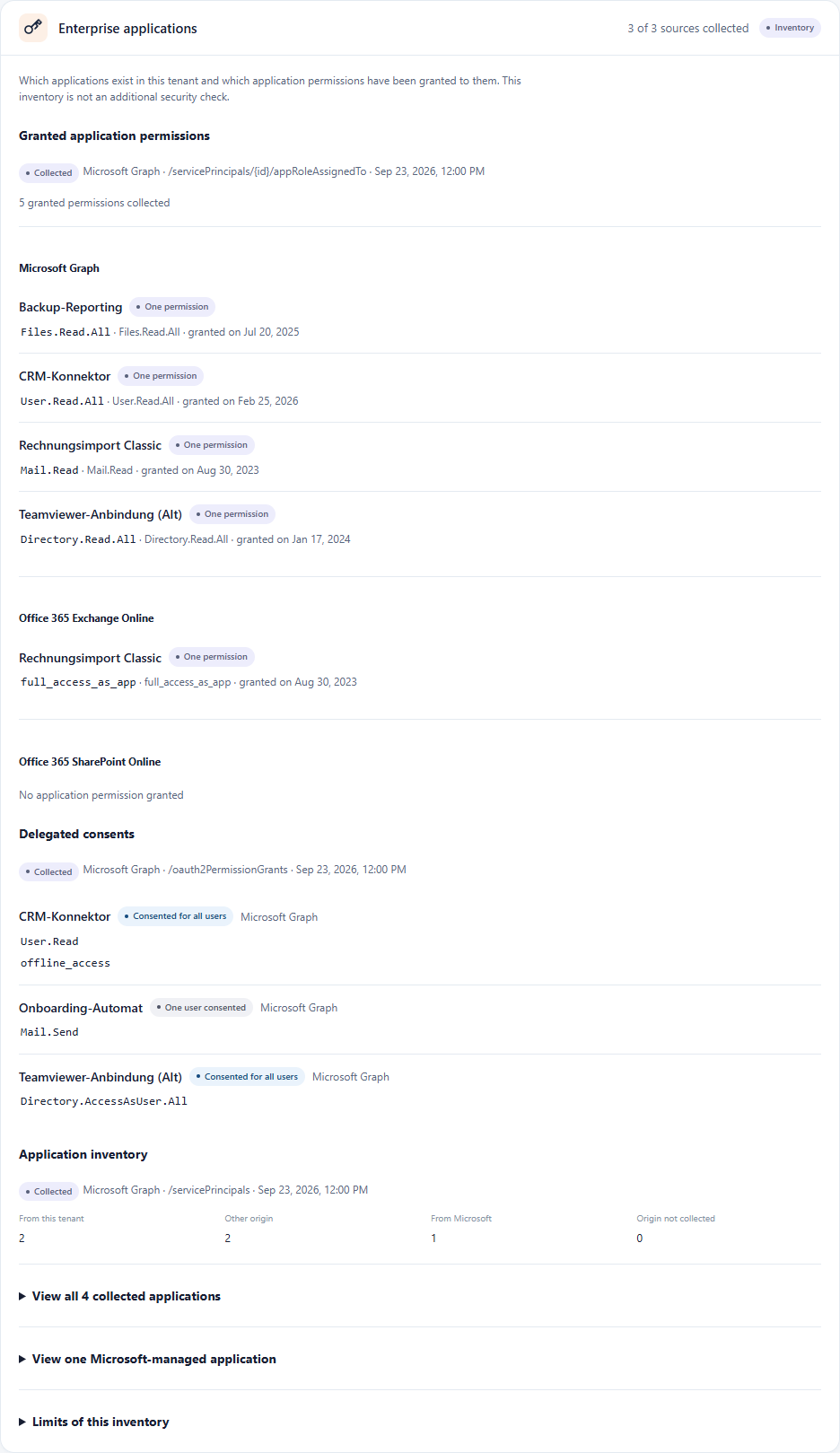
The application is called “Rechnungsimport Classic”. Its permission dates back to 2023. Does it still need that access today?
In the demo tenant, remivis records the granted permissions and when they were granted. This gives your team a concrete basis for discussing the need with the people responsible.
THE INVENTORY
The current focus: Microsoft Entra ID and its directory and policy settings.
The inventory is now the larger part of the assessment. It shows what is configured and which access has been granted. Alongside it, eleven checks assess clearly defined criteria.
Profile, domains and licences.
User, guest and group settings, plus consent policies.
Applications in the tenant and the application permissions granted to them.
Authentication methods permitted in the tenant.
Permissions consented to for individual users or all users.
Named locations and configured authentication strengths.
Password protection and expiry settings for each domain.
Admin consent workflow and technical contacts.
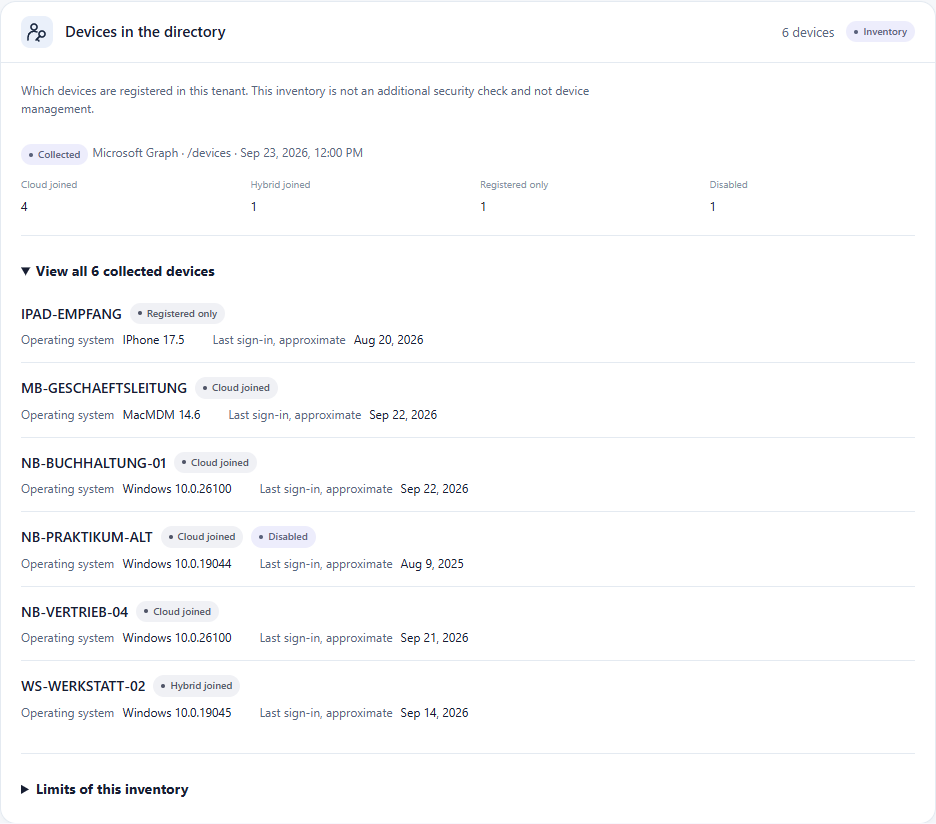
Registered devices, their join status and the recorded device information.
DEVICES ARE PART OF THE PICTURE
An old intern laptop, a hybrid-joined workstation, a registered tablet: the demo shows devices with their join status and the information available about them.
This is an inventory of directory devices. It is not device management or an Intune assessment.
A CLEAR ACCESS SCOPE
You authorise each tenant separately. remivis uses required read permissions and optional read permissions you can choose individually. It does not request write permissions.
FROM CURRENT STATE TO REASSESSMENT
Every result stays linked to its assessment. Task completion and technical verification are separate steps.
Connect and authorise each Microsoft tenant individually. Specify any accounts or apps required for the relevant checks.
Review the inventory alongside check results. Understand applications, accounts and policies, and see which criteria could be assessed.
Use the practical review steps under “Remediation”. Assign tasks to an owner, set priorities and implement appropriate changes as a team.
Run a new scan to reassess the defined criteria. A completed task alone does not prove that an issue has been technically resolved.
CURRENT PRODUCT STATUS
Alongside the inventory, eleven rules check areas including accounts, roles, MFA, baseline protection and app registrations. Each check has a defined criterion and its own prerequisites.
These results apply to the respective dated assessment. “Open” refers only to a task’s progress status.
THE PRODUCT DIRECTION
The inventory is the foundation for planned reporting and informed decisions. Further Microsoft areas are intended to have their own scope and acceptance review.
WHO IS remivis FOR?
The same transparent workflow supports three different working contexts.
Your in-house IT team assesses its own tenant, interprets results and works on appropriate actions.
You manage individual customer tenants and help customers understand and address their findings.
You manage multiple customer tenants and work through results in each customer’s context.
Each tenant is connected and authorised individually. remivis does not automatically discover customer tenants or receive blanket authorisation for all customers.
GOOD QUESTIONS. CLEAR ANSWERS.
remivis is a Microsoft cloud assessment tool for MSPs, IT service providers and internal IT teams. It inventories applications, permissions and configuration, assesses defined Entra ID criteria and supports follow-up on findings through tasks and reassessment. Access is read-only.
The current product includes nine inventory areas, eleven Entra ID baseline checks, tasks and reassessment. Data, read permissions, licences and, for some checks, declared accounts or apps determine what can actually be collected and assessed. The pilot is not a complete Microsoft 365 audit or a compliance certification.
No. The pilot is being prepared. You can express your interest by joining the waitlist. Joining does not grant access to the app.
No. remivis shows all check results: Passed, Finding, Not assessed and Not applicable. Each result belongs to a dated assessment. Open is a task progress status, not an assessment result.
No. A new scan is needed to assess the defined criteria at a new point in time. It does not confirm complete security or prove which change caused an improvement.
The responsible team evaluates and implements actions itself. remivis reads Microsoft configurations and does not perform automatic remediation. Each tenant must be connected and authorised individually.
No. remivis collects directory and policy settings and permission information. Mailboxes, files, SharePoint and Teams are not queried. When remivis shows another application’s Mail.Read permission, this does not mean that remivis itself reads mailbox contents.
Optional read permissions can be declined individually. The corresponding section is then visibly marked as not collected. remivis does not request write permissions.
No. The initial focus is Microsoft Entra ID, with the inventory areas and eleven checks described here. The device inventory, for example, is not an Intune assessment. Other Microsoft areas are not part of the currently available scope described here.
Product status: · current product version
THE NEXT STEP
For IT teams and MSPs who want to understand their inventory and follow up on findings with clear evidence.
Pilot in preparation · Microsoft Entra ID